This Phomemo Label Maker review looks at the D30, a small Bluetooth label printer designed for everyday organization at home, school, and work.
Its appeal is the combination of a pocketable format, ink-free thermal printing, and a broad selection of design tools in the Print Master app.
Phomemo D30 Review Summary
The quick verdict
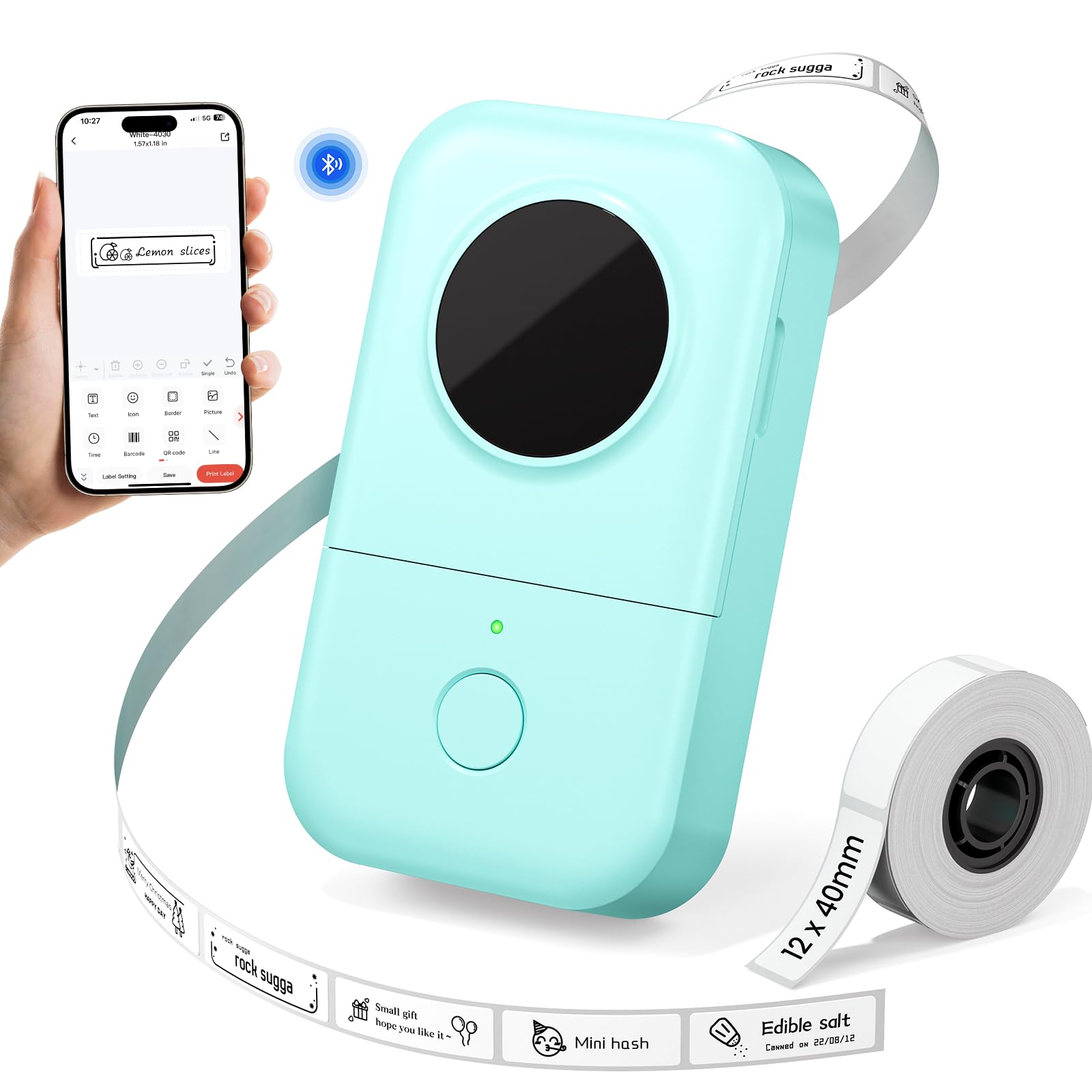
1,000+ ratings
Read Amazon ReviewsPhomemo D30 Label Maker
A portable, app-driven thermal label maker suited to home, school, and office users who want flexible designs from a phone.
- Bluetooth connection for printing from a mobile device.
- Print Master app access to over 1,000 symbols, 120 fonts, 60 frames, and 60 borders.
- Design options include text, QR codes, barcodes, and images.
- Thermal printing avoids the need for ink, toner, or ribbons.

Pros
- Small, light design is easy to carry between rooms or take along.
- Thermal operation avoids ink, toner, and ribbon replacements.
Consider before buying
- The required Print Master app may be an extra step for users already accustomed to another label-design app.
- Charging uses Micro USB, so check whether you have a suitable cable available.
Read the full review summary
The Phomemo D30 is built for short, practical labeling jobs: identifying jars and storage boxes, marking school supplies, or organizing office folders.
It prints through thermal technology, so routine use does not call for ink, toner, or ribbons, and its listed 203 DPI resolution is aimed at clear text and designs.
The phone-based workflow and wide range of templates, symbols, fonts, frames, and borders give it room for more personal labels than a basic text-only approach.
Buyers should account for the specific app requirement, Micro USB charging, and the supported tape widths when deciding whether it suits their everyday setup.
The buying factors
Phomemo D30 Scorecard
Editorial scores reflect listed features and buyer fit; they are not laboratory measurements or customer ratings.
Everyday organization
Its suggested uses cover common home, school, and office labeling tasks.
Design flexibility
The app includes extensive choices for symbols, fonts, frames, and borders.
Portability
At 0.35 pounds, the compact printer is described as easy to carry.
Print clarity potential
The stated 203 DPI resolution supports a focus on clear, sharp output.
Tape-width choice
Compatibility with four listed widths supports several label sizes.
Setup convenience
Bluetooth supports phone printing, though buyers need to use Print Master rather than the Phomemo app.
Charging practicality
Rechargeable power is convenient, while the Micro USB port is a dated connection choice for some setups.
Key Features and Specifications of Phomemo D30
- Bluetooth connection for printing from a mobile device.
- Print Master app access to over 1,000 symbols, 120 fonts, 60 frames, and 60 borders.
- Design options include text, QR codes, barcodes, and images.
- Thermal printing avoids the need for ink, toner, or ribbons.
- Listed print resolution is 203 DPI.
- Compatible tape widths include 6 mm, 12 mm, 14 mm, and 15 mm.
- Rechargeable 1,200 mAh battery, Micro USB charging port, and a listed weight of 0.35 pounds.
Pros and Cons of Phomemo D30
Pros
- Small, light design is easy to carry between rooms or take along.
- Thermal operation avoids ink, toner, and ribbon replacements.
- The app offers a substantial range of templates and design elements.
- Several tape widths accommodate different label layouts.
Consider before buying
- The required Print Master app may be an extra step for users already accustomed to another label-design app.
- Charging uses Micro USB, so check whether you have a suitable cable available.
- The description focuses on compact organization labels; buyers needing a wider label format should confirm the intended tape dimensions fit their jobs.
Who Should Buy Phomemo D30?
Good fit
Consider the D30 if you want to create labels from a phone for containers, folders, school gear, or other small organizing projects.
Bluetooth printing and the Print Master design library make it a flexible fit when labels need more than a line of plain text, such as a symbol, QR code, or image.
Its portable size may also suit households, teachers, and office users who label in more than one place.
Before choosing, identify the tape width you plan to use and make sure the supported 6, 12, 14, or 15 mm options match the size and layout you need.
The rechargeable battery and ink-free thermal method make it a straightforward tool for recurring small jobs.
The Micro USB port and app-specific workflow are worth factoring in if charging convenience or using a particular mobile app is a priority.
Who should skip it
Look elsewhere if your regular work calls for labels wider than the listed tape options or a desktop format for larger labeling jobs.
The D30 is presented as a compact organizer, so its strengths are best matched to smaller labels and mobile use.
It may also be a poor fit if you want to design and print without a phone app.
The described workflow depends on Bluetooth and Print Master, so check that this setup works with your preferred device and routine.
How the Phomemo D30 Fits Everyday Labeling
App design and label variety
The D30’s app library is one of its clearest differentiators for household and classroom organization.
More than 1,000 symbols, 120 fonts, 60 frames, and 60 borders provide options for labels that need visual distinctions, while text, QR codes, barcodes, and images widen the kinds of information a label can carry.
The app requirement is a practical part of the purchase: plan to use Print Master for this printer.
Thermal printing for recurring tasks
Thermal printing removes ink, toner, and ribbon from the routine supply list. That can simplify small repeat jobs such as labeling new containers or sorting office folders.
The 203 DPI figure gives a useful specification for comparing compact labelers, though the final appearance also depends on the label design and tape selected.
Tape width and intended scale
Compatibility with 6, 12, 14, and 15 mm tape gives buyers a few format choices for narrow labels and broader short-form layouts.
Match the width to the surface and amount of text before buying tape; long names or detailed information may need a different label format than a short jar or folder identifier.
Portability, battery, and charging
At 0.35 pounds, the D30 is designed to be easy to move or carry.
Its 1,200 mAh rechargeable battery supports cordless use, while Micro USB charging is a detail to consider when fitting it into an existing device setup.
The product information does not give a specific number of labels per charge, so buyers with frequent large batches should consider how often they expect to print.
Alternatives to Phomemo D30
Desktop Label Printers alternative

14,000+ ratings
Read Amazon ReviewsNIIMBOT D110 Label Maker
Choose between them based on app and charging fit: the D30 offers a detailed stated design library and four tape-width options, while the D110 may suit someone who prefers its NIIMBOT app workflow and Type-C charging.
Check the label formats you need before deciding.
- The NIIMBOT D110 uses the NIIMBOT app, supports batch printing, and includes a Type-C charging cord. Its description says it does not work with computers.
- The Phomemo D30 pairs Bluetooth printing with Print Master and offers four listed tape widths, from 6 mm to 15 mm.
Desktop Label Printers alternative

6,000+ ratings
Read Amazon ReviewsPhomemo M110 Label Maker
The M110 is the more relevant choice if your work needs wider labels for product, address, or retail use.
For compact home, school, and folder labels, the D30’s smaller supported widths and extensive app design options may be a closer match.
- The Phomemo M110 supports label widths from 20 mm to 50 mm and is described for uses including barcode, clothing, jewelry, retail, and mailing labels.
- Its listed connection options include Android and iOS.
- The D30 is a lightweight phone-connected option with supported tape widths up to 15 mm.
Is Phomemo D30 Worth It?
The Phomemo D30 is worth considering for phone-based, everyday labeling where portability, several narrow tape widths, and varied designs matter. Its ink-free thermal printing and broad app library suit home organization, school supplies, and office folders.
Before buying, confirm that Print Master fits your workflow, the listed tape sizes suit your labels, and Micro USB charging is convenient for you.
If your work needs wider labels or a different app and connection setup, compare models designed for those needs.
Your review at a glance
1,000+ ratings
Read Amazon ReviewsPhomemo D30 Label Maker
A portable, app-driven thermal label maker suited to home, school, and office users who want flexible designs from a phone.
- Bluetooth connection for printing from a mobile device.
- Print Master app access to over 1,000 symbols, 120 fonts, 60 frames, and 60 borders.
- Design options include text, QR codes, barcodes, and images.
- Thermal printing avoids the need for ink, toner, or ribbons.